





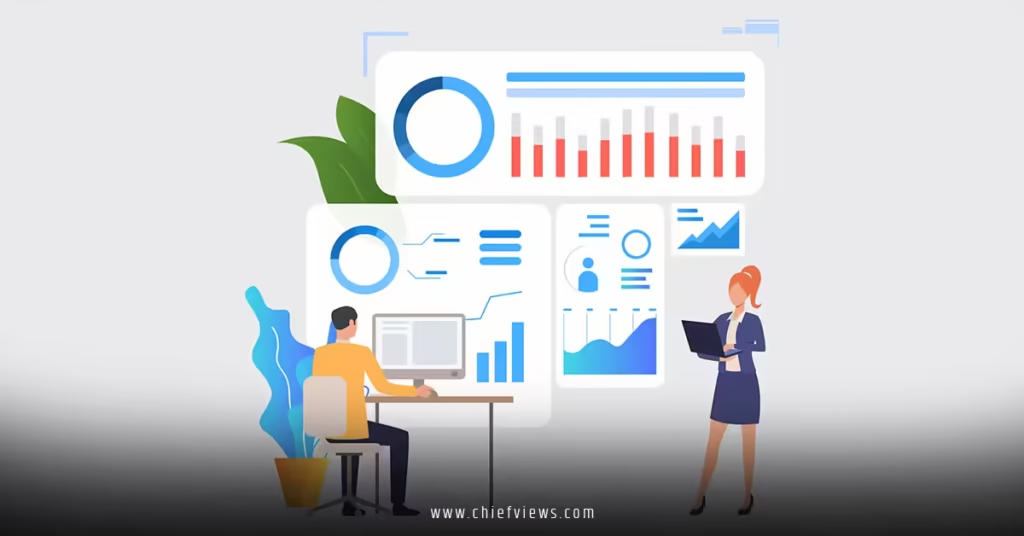
HR analytics dashboard implementation transforms scattered workforce data into actionable intelligence that drives strategic business decisions. Modern HR leaders use these visual data platforms to monitor everything from recruitment funnel performance to employee engagement trends in real-time.
Here’s what successful dashboard implementation delivers:
- Real-time visibility into key HR metrics and workforce trends
- Automated reporting that eliminates manual data compilation
- Predictive insights for proactive talent management decisions
- Executive-ready visualizations that demonstrate HR’s business impact
- Self-service analytics that empower managers with workforce data
The challenge? Most HR teams collect tons of data but struggle to turn it into useful insights. A well-implemented dashboard bridges that gap, becoming your command center for people operations.
Why HR Analytics Dashboards Matter More Than Ever
Think of your dashboard as mission control for human capital management. Without it, you’re flying blind through complex workforce decisions.
Smart HR leaders recognize that gut feelings don’t cut it anymore. Business partners expect data-backed recommendations, especially when discussing budget allocations, headcount planning, or strategic workforce initiatives.
The numbers tell the story: organizations with mature HR analytics capabilities are 5 times more likely to make faster decisions and 3 times more likely to improve their recruiting efficiency, according to Deloitte’s Human Capital Trends research.

But here’s the thing—dashboards aren’t just pretty charts. They’re strategic weapons that transform how CHROs integrate HR with digital transformation by providing the data foundation for intelligent automation and predictive workforce planning.
Essential Components of HR Analytics Dashboards
Core Metrics Categories
Talent Acquisition Metrics: Track hiring funnel performance, source effectiveness, time-to-fill, cost-per-hire, and candidate experience scores. These metrics help optimize recruiting strategies and budget allocation.
Employee Engagement and Retention: Monitor engagement survey results, turnover rates by department and tenure, exit interview insights, and stay interview feedback patterns.
Performance and Productivity: Display performance ratings distribution, goal completion rates, 360-feedback trends, and productivity indicators aligned with business outcomes.
Workforce Planning: Visualize headcount trends, skills gap analysis, succession planning readiness, and demographic diversity metrics.
Compensation and Benefits: Show pay equity analysis, benefits utilization rates, total rewards ROI, and market competitiveness benchmarks.
Technical Architecture Considerations
Your dashboard’s technical foundation determines its long-term value and scalability. Cloud-based solutions offer better flexibility than on-premise systems, especially when integrating multiple data sources.
Data Integration Layer: Connect your HRIS, ATS, performance management system, survey tools, and financial systems through APIs or automated data feeds.
Data Warehouse: Centralize cleaned, standardized data in a repository that supports both real-time and historical analysis.
Visualization Engine: Choose tools like Tableau, Power BI, or specialized HR analytics platforms that balance functionality with user experience.
Security Framework: Implement role-based access controls, data encryption, and audit trails to protect sensitive employee information.
Step-by-Step Dashboard Implementation Process
Phase 1: Requirements Gathering and Strategy (Weeks 1-4)
Start by understanding what decisions your dashboard needs to support. Interview key stakeholders—CHROs, department heads, and executive team members—to identify critical questions they need answered.
Define Success Metrics: Establish clear goals for what improved decision-making looks like. Maybe it’s reducing time-to-hire by 30% or improving retention in high-turnover departments.
Stakeholder Mapping: Identify who needs what level of access. Executives want high-level trends, HR managers need operational details, and department heads focus on team-specific metrics.
Data Audit: Document available data sources, quality levels, and integration complexity. You’ll often discover data gaps that require process changes before dashboard implementation.
Phase 2: Data Foundation Building (Weeks 5-12)
Data Source Integration: Connect systems through APIs, automated exports, or manual uploads depending on technical capabilities and budget constraints.
Data Cleaning and Standardization: Address inconsistencies in job titles, department names, location codes, and performance ratings. This unglamorous work determines dashboard accuracy.
Historical Data Preparation: Load 2-3 years of historical data to enable trend analysis and seasonal pattern recognition.
Testing and Validation: Compare dashboard calculations with known results to ensure accuracy before rolling out to users.
Phase 3: Dashboard Design and Development (Weeks 13-20)
User Experience Design: Create intuitive navigation that matches how users think about HR data. Group related metrics logically and avoid overwhelming screens with too many charts.
Visualization Selection: Choose chart types that clearly communicate insights—line charts for trends, bar charts for comparisons, heat maps for correlation analysis.
Interactivity Features: Enable filtering, drill-down capabilities, and dynamic date ranges so users can explore data relevant to their specific needs.
Mobile Optimization: Ensure key metrics display properly on smartphones and tablets for on-the-go access.
Phase 4: Testing and Training (Weeks 21-24)
User Acceptance Testing: Have representative users test functionality, identify bugs, and provide feedback on usability before full launch.
Training Program Development: Create role-specific training materials that focus on interpreting insights, not just navigating the interface.
Documentation: Build user guides, troubleshooting resources, and best practices documentation for ongoing reference.
Dashboard Design Best Practices
| Design Element | Best Practice | Common Mistake |
|---|---|---|
| Color Scheme | Use consistent colors with meaning (red = attention needed) | Rainbow charts that confuse rather than clarify |
| Chart Selection | Match chart type to data story (trends, comparisons, distributions) | Using pie charts for complex data relationships |
| Layout | Logical flow from summary to detail | Cramming too much information on single screens |
| Filters | Intuitive controls that match user mental models | Complex filter combinations that overwhelm users |
| Performance | Sub-3-second load times for all visualizations | Slow queries that frustrate daily users |
Key Performance Indicators Selection
Focus on metrics that drive action, not just interesting data points. The Society for Human Resource Management recommends starting with 15-20 core KPIs rather than trying to track everything.
Leading Indicators: Metrics that predict future outcomes, like employee engagement scores predicting turnover or interview-to-offer ratios forecasting hiring success.
Lagging Indicators: Results-based metrics that confirm what happened, such as actual turnover rates, time-to-productivity measurements, or training completion statistics.
Operational Indicators: Day-to-day metrics that keep processes running smoothly, including open requisition counts, onboarding task completion, and benefits enrollment deadlines.
Data Integration Strategies
HRIS as the Central Hub
Your Human Resource Information System serves as the master data source for employee demographics, compensation, and organizational structure. Clean, consistent HRIS data forms the foundation for reliable analytics.
Data Quality Standards: Establish rules for data entry, regular cleanup procedures, and validation checkpoints to maintain accuracy over time.
Integration Approaches: Direct database connections offer real-time data but require technical expertise. API integrations provide better security and stability for most organizations.
Connecting External Data Sources
Applicant Tracking Systems: Pull recruiting metrics including source effectiveness, candidate pipeline status, and hiring manager feedback scores.
Performance Management Platforms: Integrate goal completion rates, review scores, and development plan progress to create comprehensive talent insights.
Survey and Feedback Tools: Connect engagement surveys, pulse polls, and exit interview data to monitor employee sentiment trends.
Learning Management Systems: Track training completion, skill development progress, and certification achievements for workforce capability analysis.
Advanced Analytics Capabilities
Predictive Modeling Applications
Smart HR teams move beyond descriptive analytics to predictive insights that inform proactive decisions.
Turnover Prediction: Machine learning models identify employees at risk of leaving based on engagement scores, performance trends, and career progression patterns.
Hiring Success Forecasting: Analyze historical data to predict which candidate profiles succeed in specific roles and cultural contexts.
Workforce Planning Models: Project future headcount needs based on business growth plans, seasonal patterns, and historical hiring velocity.
Benchmarking and Comparative Analysis
Internal Benchmarking: Compare performance across departments, locations, or time periods to identify best practices and areas for improvement.
External Benchmarking: Integrate industry data from sources like the Bureau of Labor Statistics to understand competitive positioning.
Cohort Analysis: Track specific employee groups over time to measure the impact of policy changes, training programs, or management interventions.
Common Implementation Pitfalls
Over-Engineering the Initial Release
Many teams try to build comprehensive dashboards that address every possible use case from day one. This approach creates complexity, extends timelines, and overwhelms users.
Better Strategy: Start with 3-5 critical metrics that address urgent business questions. Add functionality based on user feedback and proven value.
Neglecting Data Governance
Without clear ownership and quality standards, dashboard data becomes unreliable quickly. Users lose confidence when numbers don’t match their expectations or other reports.
Solution Framework: Assign data stewards for each major data source, establish update schedules, and implement automated quality checks.
Focusing on Technology Over Insights
Beautiful visualizations mean nothing if they don’t drive better decisions. Many implementations succeed technically but fail to change how the organization operates.
Impact Approach: Define specific business questions the dashboard should answer, then design visualizations that make those answers obvious.
Insufficient Change Management
Dashboard adoption depends more on organizational culture than technical features. Users need to understand not just how to use the tool, but why it matters for their work.
Adoption Strategy: Start with influential early adopters, demonstrate quick wins, and gradually expand usage based on success stories.
Security and Compliance Considerations
HR data contains some of the most sensitive information in any organization. Dashboard implementations must balance accessibility with privacy protection.
Role-Based Access Controls: Implement granular permissions that limit data visibility based on job responsibilities and business needs.
Data Anonymization: Use aggregated data and remove personally identifiable information where possible, especially for broad organizational metrics.
Audit Trails: Track who accesses what data when to support compliance requirements and investigate potential security issues.
Regulatory Compliance: Ensure dashboard design and data handling meet requirements for GDPR, CCPA, and other relevant privacy regulations.
The U.S. Equal Employment Opportunity Commission provides guidance on maintaining confidentiality while using workforce analytics for decision-making.
Measuring Dashboard Success
Adoption Metrics
- Daily/weekly active users across different stakeholder groups
- Time spent in dashboard sessions and page views per session
- Feature utilization rates for filters, drill-downs, and exports
- Mobile access patterns and usage frequency
Business Impact Indicators
- Reduction in time spent creating manual reports
- Faster decision-making cycles for workforce planning
- Improved accuracy in budget forecasting and resource allocation
- Enhanced business partner satisfaction with HR data support
Data Quality Improvements
Track data accuracy improvements, reduced discrepancies between systems, and faster identification of data issues through automated monitoring.
Integration with Digital Transformation Strategy
HR analytics dashboards don’t exist in isolation—they’re foundational components of broader digital transformation initiatives. When CHROs integrate HR with digital transformation, analytics dashboards provide the intelligence layer that enables automated decision-making and predictive workforce planning.
Automated Workflow Triggers: Dashboard insights can automatically initiate processes like retention interventions, recruitment campaigns, or training recommendations.
Executive Reporting Integration: Connect dashboard data to boardroom presentations and strategic planning processes.
Predictive Model Feeding: Use dashboard data to train machine learning models that enhance other HR technology capabilities.
Future-Proofing Your Analytics Investment
Technology evolves rapidly, but smart dashboard implementations adapt rather than become obsolete.
API-First Architecture: Choose platforms that support easy integration with emerging technologies and changing business systems.
Scalable Infrastructure: Build capacity that grows with your organization rather than requiring complete rebuilds.
Vendor Agnostic Approach: Avoid proprietary formats that lock you into single-vendor relationships.
Continuous Learning: Plan for regular updates based on new data sources, changing business needs, and user feedback.
Key Takeaways
- Success depends more on asking the right questions than building impressive visualizations
- Data quality and governance determine long-term dashboard value and user trust
- Phased implementation with early wins beats comprehensive big-bang launches
- User adoption requires change management, not just training on technical features
- Integration with broader HR systems amplifies dashboard impact and strategic value
- Security and compliance considerations must be built in, not bolted on afterward
- Predictive analytics capabilities differentiate strategic dashboards from basic reporting tools
- Mobile accessibility and intuitive design drive daily usage and business impact
Conclusion
HR analytics dashboard implementation transforms data into strategic advantage when done thoughtfully. The key lies in balancing technical sophistication with user simplicity, ensuring your dashboard becomes an indispensable tool for daily decision-making rather than an occasional reference.
Your next step? Start with one critical business question that keeps your executives awake at night, then build a dashboard that answers it clearly. Perfect execution of simple analytics beats ambitious dashboards that nobody uses.
The future belongs to HR leaders who turn data into competitive advantage.
Frequently Asked Questions
Q: How long does HR analytics dashboard implementation typically take?
A: Most implementations require 16-24 weeks from planning to full deployment, but you can deliver initial value within 8-12 weeks by focusing on core metrics first. Complexity depends on data source integration requirements and customization needs.
Q: What’s the biggest challenge in HR analytics dashboard implementation?
A: Data quality issues cause more implementation delays and user adoption problems than any technical limitation. Plan to spend 40-50% of your effort on data cleaning and standardization before building visualizations.
Q: How much should organizations budget for HR analytics dashboard implementation?
A: Expect initial costs of $50,000-$200,000 for mid-size organizations, plus ongoing annual costs of $20,000-$50,000 for licensing and maintenance. Larger enterprises may require $500,000+ for comprehensive implementations.
Q: What skills do teams need for successful dashboard implementation?
A: You’ll need data analysts who understand HR processes, visualization specialists familiar with business intelligence tools, and project managers experienced with cross-functional technology implementations. Don’t underestimate the importance of change management expertise.
Q: How do you ensure dashboard data accuracy and reliability?
A: Implement automated data validation rules, establish regular audit procedures, assign clear data ownership responsibilities, and create feedback mechanisms for users to report discrepancies. Test calculations against known results before launching to users.