





How CTOs implement zero trust cybersecurity architecture starts with one blunt realization: your network is already compromised, or it will be. So you design as if the attacker is inside.
Within 120 words, here’s the short version of how CTOs implement zero trust cybersecurity architecture and why it matters:
- Treat every user, device, and workload as untrusted by default—on or off the corporate network.
- Replace flat, VPN-heavy networks with segmented, policy-driven access centered on identity and context.
- Use strong identity (MFA, SSO), device posture checks, and continuous monitoring to approve each action, not just logins.
- Start small: protect a high-value app, validate the model, then scale across users, apps, and environments.
- Result: less lateral movement, smaller blast radius, and architecture ready for cloud, SaaS, and hybrid work.
Let’s break this down like practitioners, not brochure writers.
What zero trust really means (and what it doesn’t)
Zero trust isn’t a product you buy from a glossy vendor deck.
At its core, it’s a security strategy and reference architecture anchored on a few principles drawn from frameworks like the NIST SP 800‑207 Zero Trust Architecture model and the U.S. Cybersecurity & Infrastructure Security Agency (CISA):
- Never trust, always verify
- Enforce least privilege access
- Assume breach and limit blast radius
- Continuously monitor and adapt
In practical terms, for a CTO:



- The “perimeter” becomes identity, device posture, and context, not a corporate firewall.
- Access is granted per resource (app, API, data set), not “VPN into everything.”
- Policies become dynamic and data‑driven, not static ACLs no one wants to touch.
What zero trust is not:
- Not “get rid of firewalls and buy a ZTNA product.”
- Not “install MFA and call it a day.”
- Not a one‑time project. It’s a multi‑year modernization program.
How CTOs implement zero trust cybersecurity architecture: the high‑level roadmap
From what usually happens in the field, successful CTOs do three things early:
- Ground the program in a recognized framework (NIST, CISA Zero Trust Maturity Model).
- Tie zero trust outcomes to specific business risks and initiatives.
- Sequence the rollout in small, winnable phases.
Here’s a simplified view of how CTOs implement zero trust cybersecurity architecture across a modern environment:
- Define the target architecture (identity‑centric, segmented, monitored).
- Harden identity & access management (IdP, MFA, conditional access).
- Discover and segment applications, data, and workloads.
- Introduce zero trust network access (ZTNA / SSE) for remote and internal access.
- Implement continuous monitoring, logging, and automated response.
- Iterate with feedback from security, infra, and product teams.
Now let’s translate that into a concrete action plan you could hand to a team.
Step‑by‑step action plan: how CTOs implement zero trust cybersecurity architecture from zero
Step 1: Anchor on a framework and define your scope
If I were starting from scratch, I’d first pick a reference model and a starting domain.
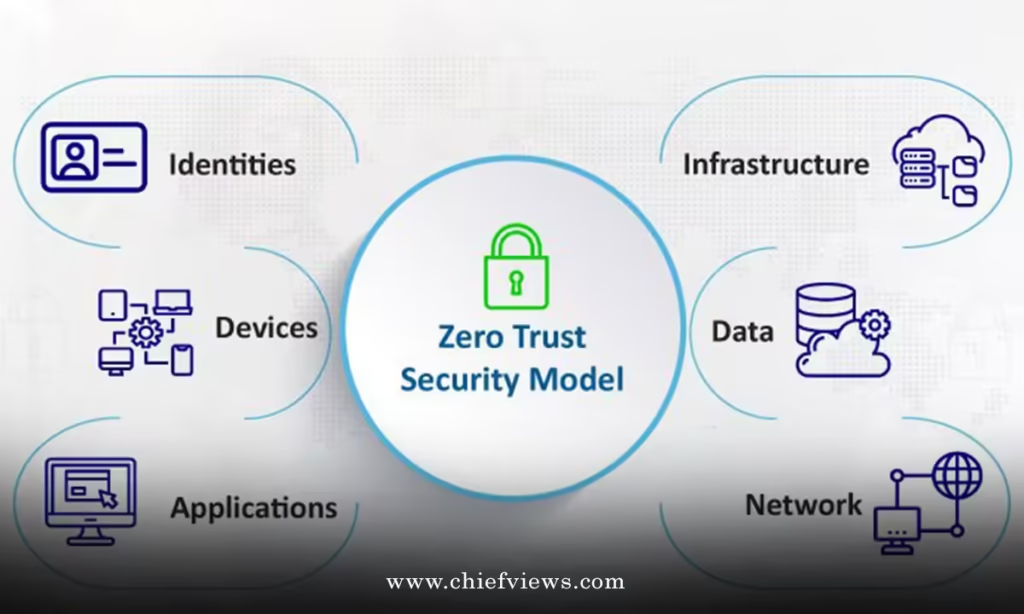
- Use the NIST Zero Trust Architecture model to clarify components: policy decision point (PDP), policy enforcement point (PEP), identity, device, network, application, data, and analytics.
- Use CISA’s Zero Trust Maturity Model to gauge where you are: traditional → advanced → optimal across pillars like identity, devices, networks, apps, and data.
Then, define your initial scope:
- A specific business unit (e.g., engineering or finance).
- A critical application (ERP, customer portal, EMR, etc.).
- Or a high‑risk environment (remote access, third‑party vendors, privileged admins).
The biggest mistake at this stage? Trying to “go zero trust” everywhere in year one.
Step 2: Build an identity‑first foundation
How CTOs implement zero trust cybersecurity architecture successfully almost always starts with identity.
What you need:
- A central identity provider (IdP) with strong support for SSO, SAML/OIDC, SCIM, and lifecycle management.
- Multi‑factor authentication (MFA) as standard for all users, enforced especially on privileged and remote access.
- Role‑based access control (RBAC) backed by clearly defined roles and group membership hygiene.
- Conditional access policies that factor in user risk, device posture, location, and session behavior.
What I’d do if your identity is a mess:
- Standardize on one primary corporate directory and IdP.
- Clean up orphaned accounts, stale groups, and unused privileges.
- Enforce MFA incrementally: admins → executives → entire company.
- Integrate HR systems with IdP so joiners/movers/leavers are automatic.
Identity is your new perimeter. If it’s weak, zero trust becomes lipstick on a pig.
Step 3: Get visibility into users, devices, apps, and data
You can’t protect what you can’t see.
As a CTO, make sure your teams can answer:
- Who are our users, and what roles do they actually need?
- What devices (managed and unmanaged) access our environment?
- Which apps are business‑critical, and where do they live (on‑prem, IaaS, SaaS)?
- Where is sensitive data stored, and who can access it?
This typically means:
- Device management via mobile device management (MDM) or unified endpoint management (UEM).
- Cloud discovery and app inventory (CASB/SaaS security, CMDB, cloud-native tools).
- Data classification and labeling for key repositories (file shares, object storage, SaaS).
Without this inventory, your zero trust policies will be either too open or so restrictive that people bypass them.
Step 4: Implement zero trust access to applications
Here’s where the architecture starts to feel different.
How CTOs implement zero trust cybersecurity architecture for application access:
- Introduce Zero Trust Network Access (ZTNA) or broader Secure Service Edge (SSE) to give users app‑level access rather than full network‑level VPN.
- For internal web apps, deploy connectors that broker traffic via the ZTNA service instead of exposing the app directly.
- Base access decisions on identity, device posture, location, and user risk—not just IP address.
- Use microsegmentation or software‑defined perimeter concepts inside data centers and clouds to limit lateral movement between services.
The effect: rather than users “jacking into the corporate network,” each request goes through a policy engine deciding: Does this user, on this device, under this context, get access to this app?
Step 5: Segment networks and workloads
Old-school flat networks are lateral movement paradise.
A pragmatic way to segment:
- Start with protecting “crown jewel” workloads: domain controllers, payment systems, patient records, source code repositories.
- Use microsegmentation tools or host‑based firewalls to restrict which services and identities can talk to those workloads.
- In cloud environments, use security groups, network policies, and service identities to limit access between resources.
Think of it like building watertight compartments in a ship. Breach one? The whole thing shouldn’t sink.
Step 6: Continuous monitoring, logging, and automated response
Zero trust assumes breach, so you monitor like it’s already happening.
What you want wired in:
- Centralized logging (SIEM or modern log analytics) for auth, access, network flows, and critical app events.
- User and entity behavior analytics (UEBA) for anomalies like impossible travel, unusual data exfiltration, or privilege escalation.
- Automated or semi‑automated response: temporarily lock high‑risk sessions, prompt for step‑up authentication, or revoke tokens.
This is where zero trust and zero trust architecture maturity become real: your policies adapt as risk changes, not once a year during a firewall rules review.
How CTOs implement zero trust cybersecurity architecture: strategic priorities by stage
Here’s a quick comparison view you can use with your leadership team.
Zero trust priorities by maturity stage
| Stage | Primary Goal | Key Moves | Typical Timeframe |
|---|---|---|---|
| Foundational | Establish identity & visibility | Centralize IdP, enforce MFA, discover apps & data, deploy basic logging | 6–12 months |
| Intermediate | App-centric zero trust access | Roll out ZTNA/SSE, segment critical apps, enforce device posture checks | 12–24 months |
| Advanced | Continuous policy & automation | Dynamic risk-based policies, automated response, deep microsegmentation, strong data controls | 24–36+ months |
The timeframes assume a mid‑size to large organization with competing priorities and legacy tech. Smaller, cloud‑first teams can move faster.
Common mistakes & how to fix them
Even experienced CTOs step on the same landmines. Here’s the short list.
Mistake 1: Treating zero trust as a “security project”
What happens:
- Security runs it alone.
- Infra, networking, product, and business units feel “done to,” not involved.
- Resistance builds, shortcuts appear, and adoption stalls.
How to fix it:
- Position zero trust as a business resilience and modernization program, not just a security upgrade.
- Create a cross‑functional steering group (security, infra, HR, product, legal, and a few savvy business leaders).
- Tie milestones to outcomes: reduced incident impact, faster vendor integration, safer remote work.
Mistake 2: Going big bang instead of phased
What happens:
- Teams try to refactor everything at once: identity, network, apps, data.
- Timelines explode, and people quietly revert to old paths (legacy VPNs, shared accounts).
How to fix it:
- Do a pilot with a single high‑value app or business unit.
- Measure: time to access, helpdesk tickets, user satisfaction, and security signals.
- Use those results and lessons to refine your patterns before scaling.
Mistake 3: Ignoring user experience
Here’s the thing: if your controls are painful, users will find a way around them.
What happens:
- Security tools slow logins, block legitimate work, or require awkward extra steps.
- Shadow IT grows as users move to unsanctioned SaaS and personal devices.
How to fix it:
- Use SSO aggressively to reduce password fatigue.
- Make MFA smart: phishing-resistant methods where possible, and avoid constant nags by using risk‑based prompts.
- Survey users and use their feedback to tune controls (within risk appetite).
Mistake 4: Over‑relying on network controls
Old habits die hard.
What happens:
- Teams rebranded their old network design as “zero trust” because they added more firewalls and VPN tunnels.
- Identity, device posture, and application context stay underused.
How to fix it:
- Re‑center design on identity, device, and application layers.
- Use network segmentation as a guardrail, not the primary decision engine.
- Map policies per application or group of services rather than broad subnets.
Mistake 5: Not using available public guidance
You don’t get bonus points for reinventing zero trust on a whiteboard.
What happens:
- Architecture drifts away from industry standards and becomes harder to explain to auditors and partners.
How to fix it:
- Use publicly available guidance from organizations like NIST and CISA to justify your approach and roadmap to leadership and regulators.
- Benchmark your maturity against widely referenced zero trust models and update it annually.
How CTOs implement zero trust cybersecurity architecture for hybrid and cloud environments
Most organizations in the U.S. are hybrid: some on‑prem, some cloud, plenty of SaaS.
For that mix, how CTOs implement zero trust cybersecurity architecture typically looks like this:
- Cloud and SaaS:
- Use your IdP for SSO into SaaS apps and cloud consoles.
- Apply conditional access policies (e.g., require compliant devices or stronger MFA for admin roles).
- Use cloud-native controls (security groups, managed identities, private endpoints) to limit access paths.
- On‑prem apps:
- Front legacy web apps with ZTNA connectors to avoid full network exposure.
- Implement reverse proxies or application gateways that enforce auth and policies.
- Gradually retire VPN access in favor of app‑centric access.
- Developers and CI/CD:
- Protect code repositories and build systems with zero trust access and strong identity.
- Move away from long‑lived keys toward short‑lived, identity‑based credentials for workloads.
Think of the architecture as an air traffic control tower for access. Every plane (user or workload) gets cleared for a specific route, at a specific time, under specific conditions.
Governance, org structure, and “who owns what”
Technology is the easy part. Governance is where things fall apart.
How CTOs implement zero trust cybersecurity architecture organizationally usually includes:
- A shared ownership model:
- Security defines standards, guardrails, and monitoring.
- Infrastructure and platform teams implement and run the controls.
- Application teams integrate policy enforcement into their services.
- Clear accountability:
- Someone owns the zero trust roadmap and reports quarterly on progress.
- App owners are responsible for mapping their applications, data, and required access.
- Policy lifecycle:
- Access policies get versioned, reviewed, and attested regularly, especially for high‑privilege roles and sensitive data.
Zero trust changes who can say “yes” or “no” to access. That’s political. Plan for that.
Practical tips for CTOs selling zero trust to the C‑suite and the board
You’ll need budget, patience, and executive backing.
To make the case:
- Link zero trust to regulatory and government guidance, especially if you operate in sectors referenced in U.S. executive orders on cybersecurity or follow frameworks like NIST Cybersecurity Framework.
- Emphasize resilience: smaller blast radius, faster containment, better investigative data.
- Use recent high‑profile breaches as teaching examples: lateral movement via flat networks, compromised VPN credentials, abused privileged accounts.
And then, give them a simple line:
“Zero trust doesn’t guarantee we won’t be breached. It makes sure one compromised account doesn’t compromise the entire company.”
That’s a board‑friendly story.
Key takeaways
- How CTOs implement zero trust cybersecurity architecture starts with identity, not firewalls or shiny boxes.
- You don’t “buy” zero trust—you design and phase it in using frameworks like NIST and CISA guidance.
- Start small: one business unit or high‑value app, prove it works, then scale.
- User experience is non‑negotiable; painful controls create shadow IT and weaken security.
- Continuous monitoring and adaptive policies turn zero trust from a diagram into a living system.
- Governance and cross‑functional ownership matter as much as technology.
- Zero trust is a multi‑year modernization journey, but each phase can deliver tangible risk reduction.
You don’t need perfection to start. You need a clear first target, a realistic roadmap, and the discipline to iterate.
FAQs
How do CTOs implement zero trust cybersecurity architecture if they’re stuck with legacy on‑prem systems?
For legacy on‑prem apps, how CTOs implement zero trust cybersecurity architecture usually involves wrapping rather than rewriting. Use ZTNA connectors, reverse proxies, and identity‑aware gateways to front those apps, enforce SSO and MFA at the edge, and segment the underlying networks so only the right identities and services can reach them. Over time, refactor or replace the most fragile legacy apps with cloud‑friendly, identity‑centric designs.
What budget level is typical when CTOs implement zero trust cybersecurity architecture?
Budgets vary widely, but how CTOs implement zero trust cybersecurity architecture often involves reallocating spend rather than just adding new costs. Many organizations offset expenses by reducing VPN infrastructure, consolidating overlapping security tools, and using capabilities already present in their IdP, cloud providers, and device management platforms. The key is to treat it as a multi‑year program with staged investments tied to measurable risk reduction.
How can CTOs measure success when they implement zero trust cybersecurity architecture?
To measure how CTOs implement zero trust cybersecurity architecture effectively, track metrics like reduction in standing privileged accounts, percentage of apps behind SSO and MFA, number of users accessing via ZTNA vs. legacy VPN, time to detect and contain suspicious activity, and the blast radius of simulated incidents during red‑team exercises. Combine those with qualitative feedback from users about access friction to keep both security and productivity moving in the right direction.