








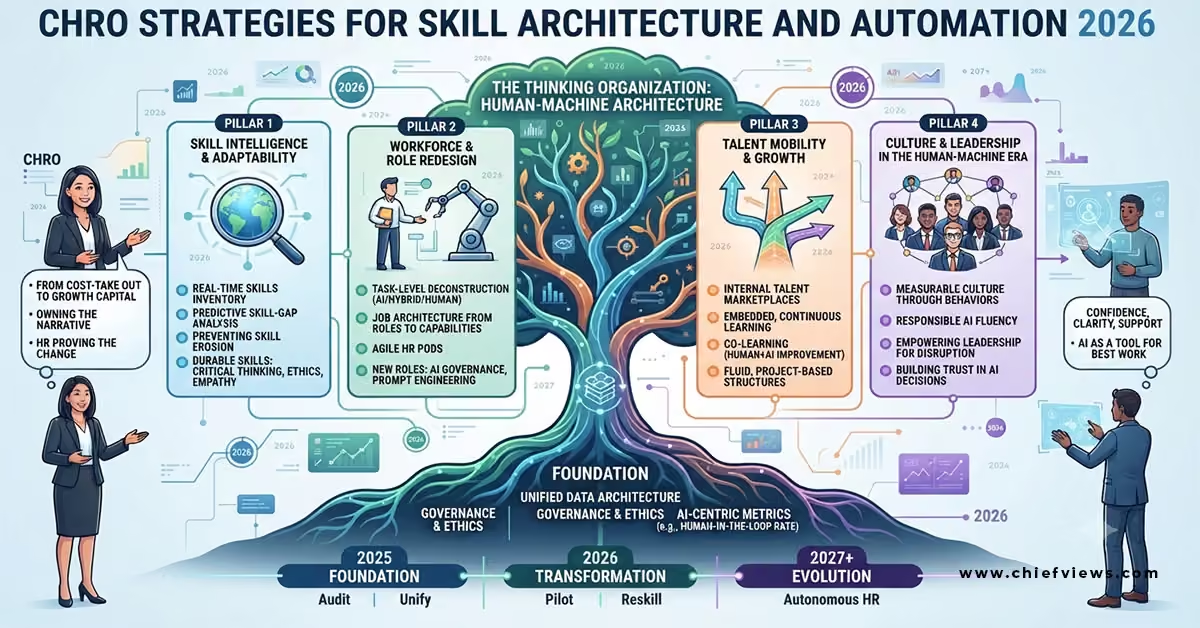
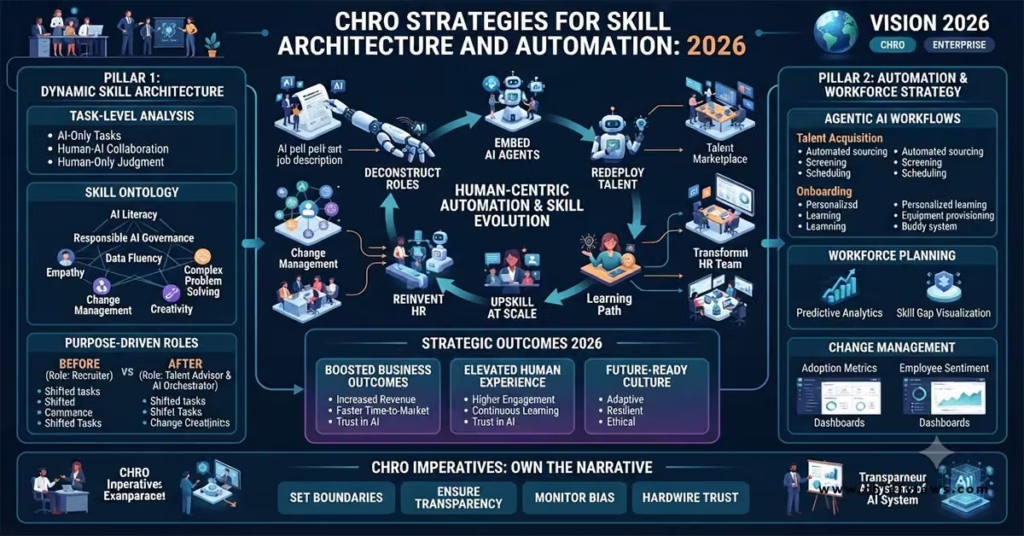
CHRO strategies for skill architecture and automation 2026 are no longer some side project you hand off to a learning-and-development intern. They’re the main event. Every serious People leader I talk to is wrestling with the same question: how do you build an organization around skills instead of job titles, while AI quietly rewrites half the tasks on everyone’s plate?
Here’s the quick version before we dig in:
- Skill architecture means mapping your workforce by capabilities, not job descriptions — so you can redeploy talent fast when roles shift.
- Automation is reshaping which skills matter; routine tasks go to machines, judgment and adaptability stay human.
- CHROs in 2026 are building “skills clouds” — searchable, verified inventories of what people can actually do.
- The payoff: faster internal mobility, smarter workforce planning, and fewer panic-hires when a role suddenly needs new capabilities.
- Get it wrong, and you end up automating busywork while your skills gaps quietly get worse.
That’s the gist. Now let’s get into how this actually works on the ground.
What “Skill Architecture” Actually Means
Forget the buzzword fog for a second. Skill architecture is just a structured map of every capability your people have — and every capability your business needs — laid out so you can compare the two at a glance.
Job titles lie. A “Senior Analyst” at one company does completely different work than a “Senior Analyst” three floors down. Skills don’t lie the same way. Coding in Python is coding in Python, wherever you sit.
In my experience, the companies that get this right build a shared skills taxonomy first — before they touch a single automation tool. Skip that step, and you’re automating blind.

The Automation Pressure Point
Automation isn’t the villain here. It’s the accelerant. According to the World Economic Forum’s Future of Jobs Report 2025, 63% of employers name skills gaps as the single biggest barrier to business transformation over the next five years — bigger than regulation, bigger than funding constraints.
That number should sit uncomfortably with any CHRO. Why? Because it means the bottleneck isn’t the technology anymore — it’s whether your people can keep pace with it.
Automation strips out the repetitive stuff: data entry, scheduling, first-draft reporting. What’s left is the judgment-heavy, relationship-heavy, ambiguous work — the stuff a skill-based org can actually route to the right person, fast.
CHRO Strategies for Skill Architecture and Automation 2026: The Core Framework
Here’s where CHRO strategies for skill architecture and automation 2026 split from the generic “future of work” advice you’ve read a hundred times. It’s not about picking an AI vendor. It’s about sequencing three moves correctly.
- Build the skills inventory first — surveys, manager validation, and skills inferred from project history.
- Layer automation on top of the gaps — not the other way around.
- Redesign jobs around what’s left for humans — and keep redesigning as automation absorbs more.
SHRM’s 2026 CHRO research backs this sequencing up: 92% of CHROs surveyed expect greater AI integration into workforce operations, and 84% expect upskilling in AI-specific skills to accelerate right alongside it. Those two numbers move together — not by coincidence, by design.
Here’s a simple breakdown comparing the old job-based model to what a skill-architecture-plus-automation model actually looks like in practice:
| Dimension | Job-Based Model (Legacy) | Skill-Based + Automation Model (2026) |
|---|---|---|
| Workforce planning unit | Job title / headcount | Verified skill + task capability |
| Hiring speed for new needs | Slow — new req, new title, new cycle | Fast — redeploy internally via skills match |
| Response to automation of a task | Role becomes redundant or stagnant | Worker reassigned to adjacent higher-value skill |
| Internal mobility rate | Low, siloed by department | High, skills visible org-wide |
| Typical rollout timeline | N/A (static structure) | 6–18 months for taxonomy + tooling maturity |
| Risk if neglected | Slow drift into irrelevance | Short-term disruption, faster long-term recovery |
Notice the pattern? The skill-based column isn’t magic. It’s just faster feedback loops. Think of it like switching from a filing cabinet to a search engine — same information, radically different retrieval speed.
Step-by-Step Action Plan for Beginners
If you’re starting from zero, don’t try to boil the ocean. Here’s the order I’d actually follow.
- Audit your current job architecture. Pull every job description. You’ll find it’s stale — most are.
- Build (or buy) a skills taxonomy. Pick a standard framework rather than inventing one from scratch; consistency matters more than perfection here.
- Validate skills with managers, not just self-reports. Self-assessed skills are optimistic. Always.
- Map automation candidates against the taxonomy. Which tasks, not jobs, are ripe for automation?
- Redesign roles around the remaining human-critical work. This is the step everyone rushes — don’t.
- Pilot in one function. Finance or customer ops usually works well as a test bed.
- Scale with governance. Set clear ownership for keeping the skills data fresh — stale data kills this fast.
What I’d do if I were walking into this cold: start the pilot in a team that already complains loudly about repetitive work. You’ll get buy-in for free.
Common Mistakes & How to Fix Them
Here’s the thing — most skill architecture efforts don’t fail because of bad technology. They fail because of sequencing and ownership mistakes.
- Mistake: Automating before mapping skills. You end up automating tasks nobody tracked, and you can’t tell what capability gap just opened up. Fix: Freeze automation rollout until the skills inventory baseline exists.
- Mistake: Treating skills data as a one-time project. It goes stale in months, not years. Fix: Assign an owner and a quarterly refresh cadence — treat it like payroll data, not a survey you ran once.
- Mistake: No manager validation. Self-reported skills inflate competence by a wide margin. Fix: Build a lightweight manager sign-off step into every skills update.
- Mistake: Ignoring change management. Employees hear “automation” and think “layoffs,” full stop. Fix: Communicate the redeployment plan before the automation announcement, not after.
- Mistake: Centralizing all decisions in HR. Business units resent a top-down taxonomy they didn’t help build. Fix: Co-design the taxonomy with operational leaders from day one.
The kicker is that most of these mistakes are sequencing errors, not strategy errors. Fix the order, and the strategy mostly fixes itself.
CHRO Strategies for Skill Architecture and Automation 2026 in a Tight Labor Market
Here’s a wrinkle beginners miss: this isn’t happening in a vacuum. Boston Consulting Group’s 2026 analysis of CHRO priorities argues that skills-based workforce planning has to be refreshed function by function, because AI’s impact on roles varies wildly by team.
Marketing doesn’t automate the same way manufacturing does. Legal doesn’t automate the same way customer support does. A single, org-wide automation rollout plan is almost always a mistake — treat each function’s skill architecture as its own mini-project nested under one shared taxonomy.
Key Takeaways
- CHRO strategies for skill architecture and automation 2026 start with mapping capabilities, not job titles.
- Skills gaps, not technology limits, are the top barrier to transformation for 63% of employers globally.
- SHRM research shows 92% of CHROs expect deeper AI integration, and 84% expect faster AI-specific upskilling.
- Sequence matters: inventory skills first, automate second, redesign roles third.
- Manager-validated skills data beats self-reported data every time.
- Pilot in one function before scaling org-wide.
- Communicate redeployment plans before automation announcements to avoid panic.
- Treat skills taxonomies as living data, refreshed quarterly — not a one-time audit.
None of this is theoretical anymore. It’s operational. CHROs who build the skills map before chasing automation tools end up with a workforce that bends instead of breaks when the next AI wave hits. The ones who automate first and ask questions later? They end up re-hiring for roles they just eliminated, which is about as expensive a mistake as HR can make.
Start small. Pick one function. Build the taxonomy. Pilot the automation. Scale what works. That’s the whole playbook, honestly — the rest is discipline.
FAQs
What’s the fastest first step for CHRO strategies for skill architecture and automation 2026?
Start with a skills audit in a single function before touching automation tools — you need a baseline before you can measure what automation changes.
How is skill architecture different from a regular competency framework?
Competency frameworks tend to describe desired traits broadly; skill architecture is more granular and operational, mapping specific, verifiable capabilities to actual tasks and automation risk.
Do CHRO strategies for skill architecture and automation 2026 require new software?
Not necessarily at first — a validated spreadsheet-based taxonomy can work for a pilot; dedicated skills-intelligence platforms usually come in once you’re ready to scale beyond one function.

